

Appearance
NinjaOne — Recommended Script Library Imports
Import these scripts from the NinjaOne Template Library during integration setup. Once imported, the Junto agent can use them for device management, troubleshooting, and security response. The agent always requests technician approval before executing any script.
How to Import
- In NinjaOne, go to Administration > Library > Automation.
- Select the Template Library tab.
- Find the script you want to import and click the ... menu.
- Select Import.
- Click Save.
Repeat for each script you want to make available to the agent.
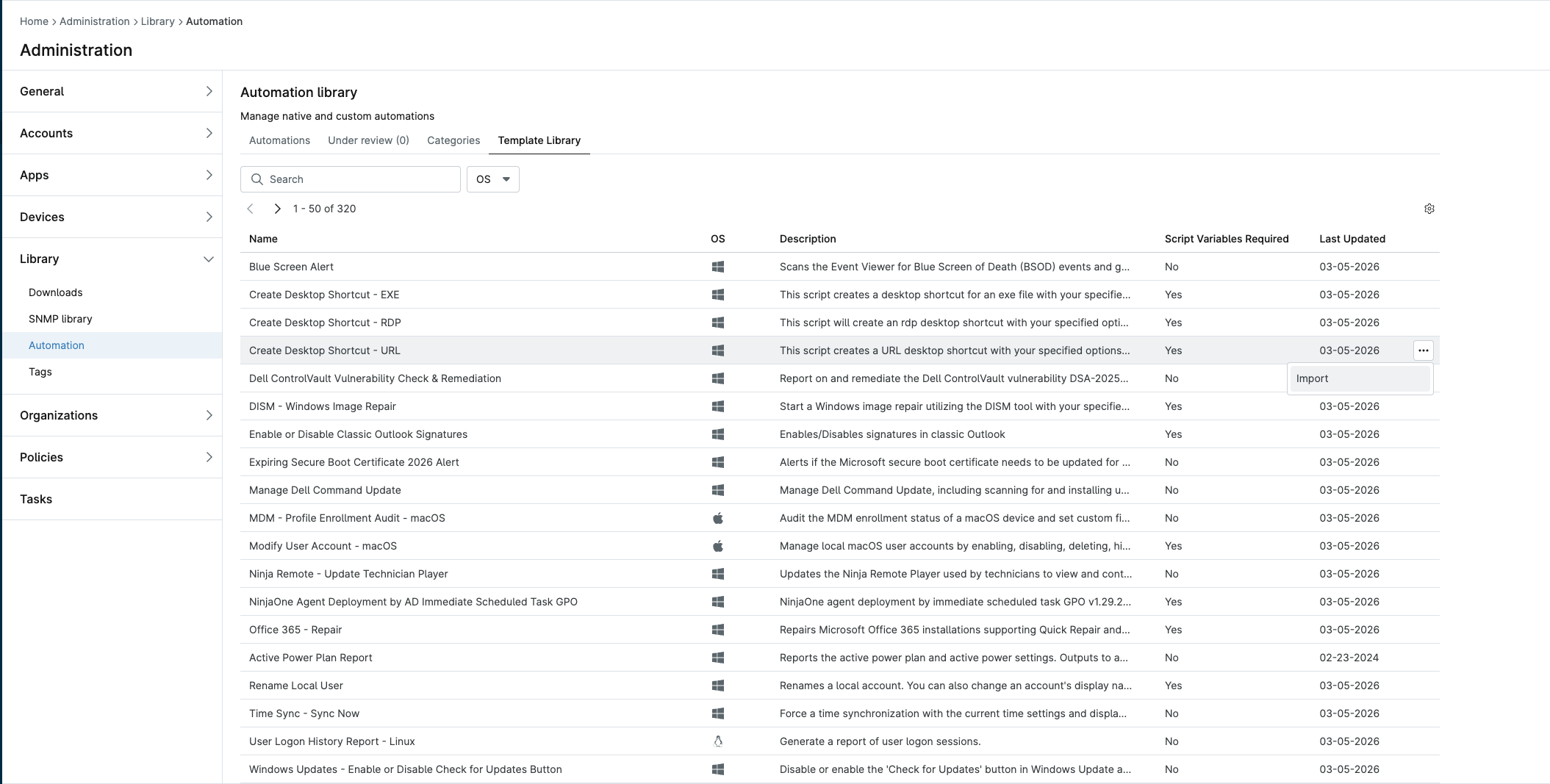
Recommended Scripts
These scripts cover the most common agent workflows. Import all of them.
Troubleshooting & Repair
| Script | OS | Variables | Use Case |
|---|---|---|---|
| DISM - Windows Image Repair | Windows | Yes | Repair corrupted Windows system files |
| Office 365 - Repair | Windows | Yes | Quick or Online repair of Office installations |
| Time Sync - Sync Now | Windows | No | Force time synchronization when clocks drift |
| WMI - Health Check | Windows | No | Diagnose WMI issues causing monitoring failures |
| System Performance Check | Windows | Yes | Collect CPU, memory, disk, network diagnostics |
| System Performance Check - macOS | macOS | Yes | Same for macOS endpoints |
User & Account Management
| Script | OS | Variables | Use Case |
|---|---|---|---|
| Create New Local User | Windows | Yes | Provision local accounts with auto-generated passwords |
| Rename Local User | Windows | Yes | Rename local accounts |
| Modify User Account - macOS | macOS | Yes | Enable, disable, delete, hide macOS accounts |
| Local Users Report | Windows | No | Audit local accounts on a device |
| User Logon History Report | Windows | No | Investigate logon/logoff sessions |
| User Logon History Report - Linux | Linux | No | Same for Linux endpoints |
Security & Compliance
| Script | OS | Variables | Use Case |
|---|---|---|---|
| Verify running processes are signed | Windows | No | Find unsigned processes (compromise indicator) |
| Block Microsoft Account Creation | Windows | Yes | Enforce corporate account policy |
| Blue Screen Alert | Windows | No | Detect BSOD events for proactive response |
| Expiring Secure Boot Certificate 2026 Alert | Windows | No | Identify devices needing certificate updates |
| Windows Updates - Secure Boot Certificate Management | Windows | Yes | Apply the Secure Boot certificate fix |
| Dell ControlVault Vulnerability Check & Remediation | Windows | No | Detect and remediate Dell CVE DSA-2025-053 |
| Enable or Disable UFW Firewall - Linux | Linux | Yes | Manage Linux firewall state |
| File or Folder Exists Alert | Windows | Yes | Alert on presence of suspicious files |
Windows Updates & Maintenance
| Script | OS | Variables | Use Case |
|---|---|---|---|
| Windows Updates - Reset Update Settings to Default | Windows | No | Fix broken Windows Update configurations |
| Windows Updates - Enable or Disable Check for Updates Button | Windows | No | Control update behavior on managed devices |
| System Restore - Check Status | Windows | No | Verify System Restore is enabled |
| System Restore - Create a Restore Point | Windows | No | Create restore point before changes |
| System Restore - Restore Point Report | Windows | No | Audit available restore points |
Software Management
| Script | OS | Variables | Use Case |
|---|---|---|---|
| Uninstall a Windows Application | Windows | Yes | Remove applications via standard uninstall |
| Software Removal - Uninstall Dell Support Assist | Windows | No | Remove bloatware |
| Install PowerShell 7 | Windows | No | Upgrade to modern PowerShell |
| Install PowerShell 7 - macOS | macOS | No | Same for macOS |
| Install PowerShell 7 - Linux | Linux | No | Same for Linux |
| Manage Dell Command Update | Windows | No | Scan for and install Dell firmware/driver updates |
Network & Connectivity
| Script | OS | Variables | Use Case |
|---|---|---|---|
| Get Current Wi-Fi Password | Windows | Yes | Retrieve Wi-Fi credentials (saves to secure field) |
| Wi-Fi Report | Windows | No | Generate wireless LAN diagnostics |
| Active Power Plan Report | Windows | No | Audit power settings affecting performance |
Reporting & Inventory
| Script | OS | Variables | Use Case |
|---|---|---|---|
| Active Directory - Audit Report | Windows | Yes | AD environment overview |
| Detect Windows 10 ESU | Windows | No | Identify devices eligible for Extended Security Updates |
| MDM - Profile Enrollment Audit - macOS | macOS | No | Audit MDM enrollment status |
Optional Scripts
These are useful but less commonly triggered by the agent.
| Script | OS | Variables | Use Case |
|---|---|---|---|
| Create Desktop Shortcut - EXE | Windows | Yes | Deploy application shortcuts |
| Create Desktop Shortcut - URL | Windows | Yes | Deploy URL shortcuts |
| Create Desktop Shortcut - RDP | Windows | Yes | Deploy RDP shortcuts |
| Display PopUp | Windows | No | Show messages to end users |
| Set Default Filetype Associations | Windows | Yes | Configure default apps |
| Enable or Disable Classic Outlook Signatures | Windows | Yes | Manage Outlook signature settings |
| Enable or Disable Location Services - macOS | macOS | Yes | Toggle macOS location services |
| Ninja Remote - Update Technician Player | Windows | No | Update remote control tool |
| Remove Notepad++ | Windows | No | Remove Notepad++ |
Not Recommended for Import
These are specialized or internal NinjaRMM scripts that don't apply to typical agent workflows:
- NinjaOne Agent Deployment by AD Immediate Scheduled Task GPO — Infrastructure deployment, not agent-driven
- Ninja - Windows 365 Cloud PC - Partner Connector Tool — One-time setup, security-sensitive
- DEX Survey Scripts (1-3) — End-user experience surveys, not troubleshooting