

Appearance
ConnectWise Pod
The ConnectWise Pod embeds Junto's agentic triage interface directly inside ConnectWise PSA service tickets. Technicians can access the agent's analysis without leaving their PSA.
What is a Pod?
A Pod is a custom panel that appears within a ConnectWise service ticket. Junto's Pod displays the triage conversation, signal metadata, and available actions for the current ticket.
Setup Overview
Getting the pod in front of your team is a two-part process:
| Step | Who | How often |
|---|---|---|
| Enable the pod in ConnectWise | A Junto admin | Once per ConnectWise instance |
| Add the pod to the Service Ticket view | Every technician | Once per ConnectWise user |
Each technician must add the pod themselves
ConnectWise stores pod layouts per user. Enabling the pod makes Junto available on the Service Ticket screen, but it will not appear for a technician until they add it to their own view.
Requirements
- The ConnectWise PSA integration must be configured and connected.
- The technician must have a Junto account in your organization.
- The ticket must be synced to Junto as a signal.
- The technician's ConnectWise security role must have Inquire access to Manage Hosted API (see below).
Security Role Permission for Technicians
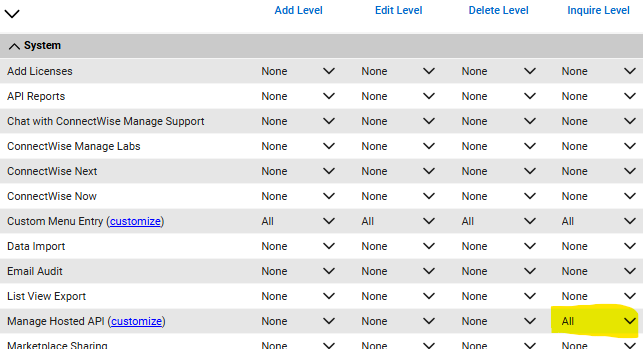
Pods are delivered through ConnectWise's Hosted API, so every technician who will use the Junto pod needs Inquire permission on Manage Hosted API in their ConnectWise security role. Without it, Junto does not appear in the list of available pods for that user.
Default Manager and Technician security roles typically do not include this permission, so check each role your team uses:
- In ConnectWise, go to System > Security Roles and open the role.
- Expand the System section.
- On the Manage Hosted API row, set Inquire Level to All. The Add, Edit, and Delete levels can stay at None.
- Save the role.
TIP
This is separate from the permissions on the Junto API member's security role, which already includes Manage Hosted API. This permission has to be on the security roles assigned to your technicians.
Step 1: Enable the Pod (Admin)
Automatic Setup (Recommended)
- In Junto, go to Settings > Integrations > ConnectWise PSA.
- Under Service Ticket Pod, check Auto-configure pod in ConnectWise.
- Wait for the status badge to change to Configured.
Junto registers the pod in ConnectWise for you. Once it is configured, a Pod Configured - User Setup Required card appears as a reminder that each technician still needs to complete Step 2.
To remove the pod later, uncheck Auto-configure pod in ConnectWise.
Manual Setup
If you prefer to register the pod yourself, expand Manual Setup Instructions on the same settings page to copy the exact values for your account, then:
- In ConnectWise, go to System > Setup Tables > Manage Hosted API.
- Create a new entry with the following values:
| Field | Value |
|---|---|
| Description | Junto |
| Screen | Service Ticket |
| URL | Copy from Manual Setup Instructions in Junto |
| Origin | Copy from Manual Setup Instructions in Junto |
| Type | Pod |
| Pod Height | 660 |
- Save the entry.
Step 2: Add the Pod to Your Ticket View (Every Technician)
Complete these steps after an admin has enabled the pod in Step 1 -- until then, Junto will not appear in the list of available pods. Each technician completes them once in their own ConnectWise login.
In ConnectWise, open any Service Ticket.
Open Pod Configuration using either method:
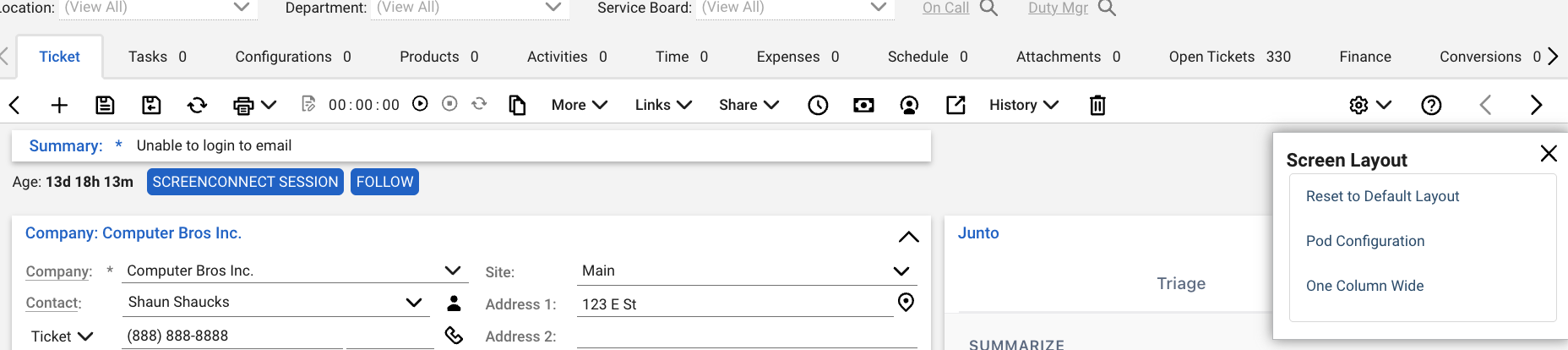
From the toolbar -- Click the gear icon on the right side of the ticket toolbar, then select Pod Configuration from the Screen Layout menu.
From the hint pod -- Find the panel labeled Drag a pod here or click to add a pod and click the plus icon.

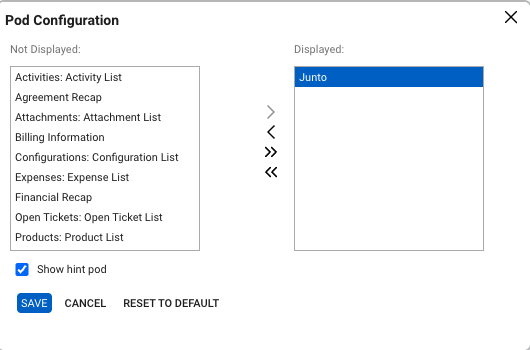
In the Pod Configuration dialog, select Junto in the Not Displayed list and click the > arrow to move it to Displayed.
Click Save.
Drag the Junto pod by its title bar to the top right of the ticket layout. This keeps the agent's summary and triage conversation visible next to the ticket details without scrolling.
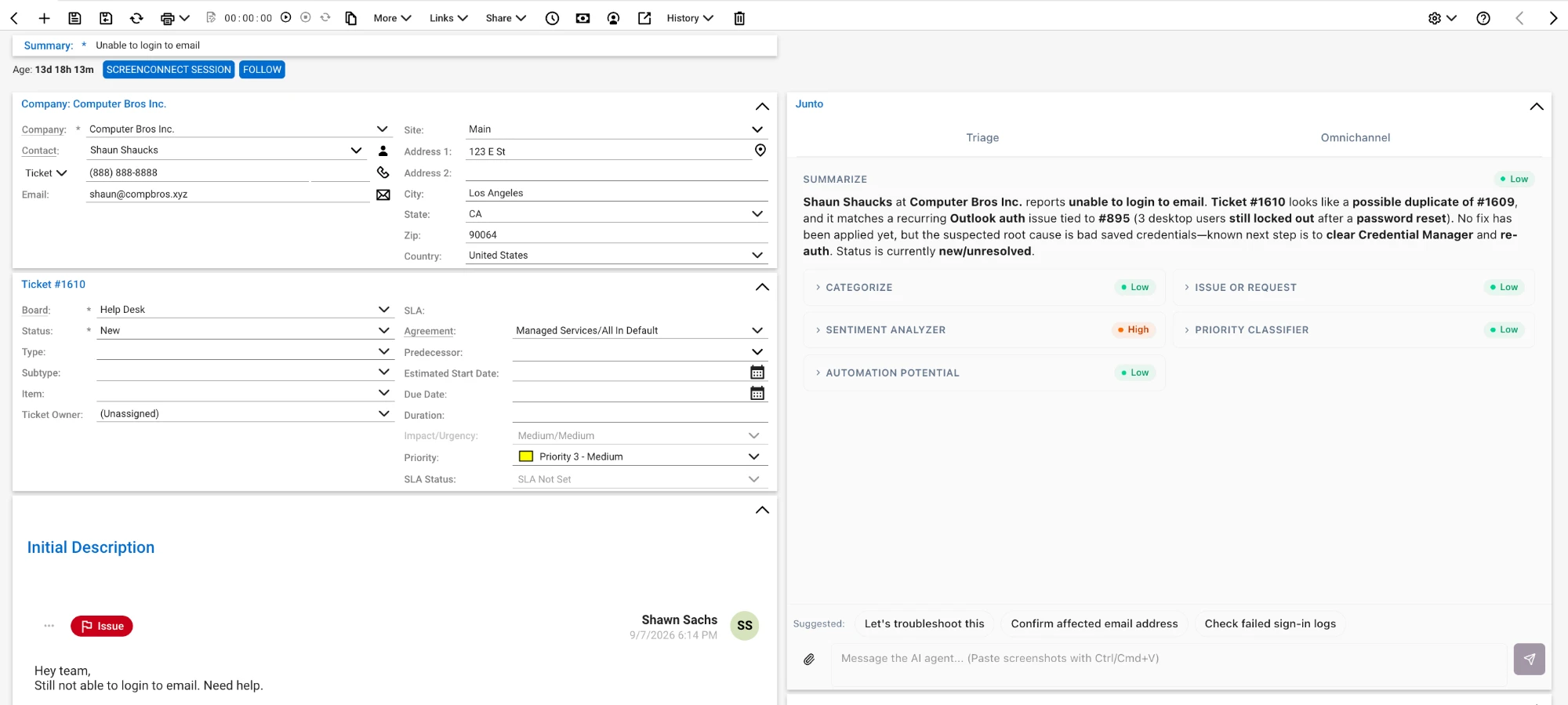
The Junto pod now appears in that position on every Service Ticket for that technician.
Don't see the hint pod?
The Drag a pod here or click to add a pod panel can be hidden. Use the gear icon method instead, and re-check Show hint pod in the Pod Configuration dialog if you want the panel back.
Signing In
The first time a technician opens the pod, they are prompted to sign in to Junto. The pod supports two methods:
- OAuth -- Sign in with your Microsoft or Google account.
- Email OTP -- Choose Sign in with Email to receive a 6-digit one-time passcode. This is the method used in the ConnectWise desktop client.
Sign in with the same email address you use for Junto. Sessions last 30 days, so technicians are not prompted on every ticket.
What the Pod Provides
- Triage conversation -- The same conversational interface available in the Junto app, embedded in ConnectWise.
- Signal metadata -- View processor results, categories, sentiment, and automation scores.
- Quick actions -- Approve or deny tool requests directly from within ConnectWise.
Troubleshooting
| Problem | What to check |
|---|---|
| Junto is not listed in Pod Configuration | Either the pod has not been enabled yet, or the technician's security role lacks the permission. Ask a Junto admin to complete Step 1 and confirm the status shows Configured, then check that the technician's ConnectWise security role has Inquire on Manage Hosted API (see Requirements). |
| The pod shows for some technicians but not others | Pod layouts are per user. Each technician needs to complete Step 2. |
| Microsoft or Google sign-in does not complete | Use Sign in with Email instead and enter the 6-digit code sent to your inbox. |
| "Subscription inactive" message | The Junto organization you signed in to does not have an active subscription. Sign in with the account tied to your active organization. |
| The pod loads but no ticket appears | The ticket has not been synced to Junto as a signal yet. Confirm the ticket's service board is selected under Map Service Boards. |
FAQ
Why do other technicians see the same Pod conversation?
The Pod's agent session is tied to the ticket. Technicians who open the same ticket share its conversation history, so another technician can see what has already been discussed or tried when they take over or help with the ticket.
Can I tell who approved an action in a shared conversation?
Yes. Each approval is recorded against the user who approved the action in the audit log, even when multiple technicians share the Pod conversation. The conversation's use of "you" does not change that attribution.