

Appearance
Google Workspace Setup
Junto connects to Google Workspace through the Google Admin SDK and Gmail API, giving the AI agent access to users, groups, organizational units, licenses, mobile devices, and email settings across your customer domains.
Prerequisites
- A Google Workspace account with Super Admin access for the customer's domain
- The customer domain must have Google Workspace (Business, Enterprise, or Education)
Connect via OAuth
- In Junto, go to the company's Integrations page.
- Find Google Workspace and click Connect.
- Authenticate with Super Admin credentials for the customer's domain.
- Review and accept the requested permissions.
- After authorization, you are redirected back to Junto with an active connection.
The connection is managed automatically from there, including token refresh.
Domain-Wide Delegation
Domain-Wide Delegation (DWD) is an Alpha feature that lets Junto act on behalf of individual mailboxes in your Google Workspace tenant. It unlocks the Gmail-settings and per-user filter tools — including Set Email Signature, Get/Set Vacation Settings, and the Block / Allow / Unblock Sender tools — that cannot work through OAuth alone. Every other Google Workspace tool works through OAuth and does not require DWD.
Setting up DWD requires a Google Cloud service account with domain-wide delegation authorized in the Google Admin Console, then uploading the service account's JSON key to Junto.
Prerequisites
- A Google Cloud project associated with the customer's Workspace tenant
- Owner or Service Account Admin role on that Google Cloud project
- Google Workspace Super Admin access for the Admin Console authorization step
- The Gmail API enabled on the project (covered in Step 4 below)
Step 1 — Create the service account
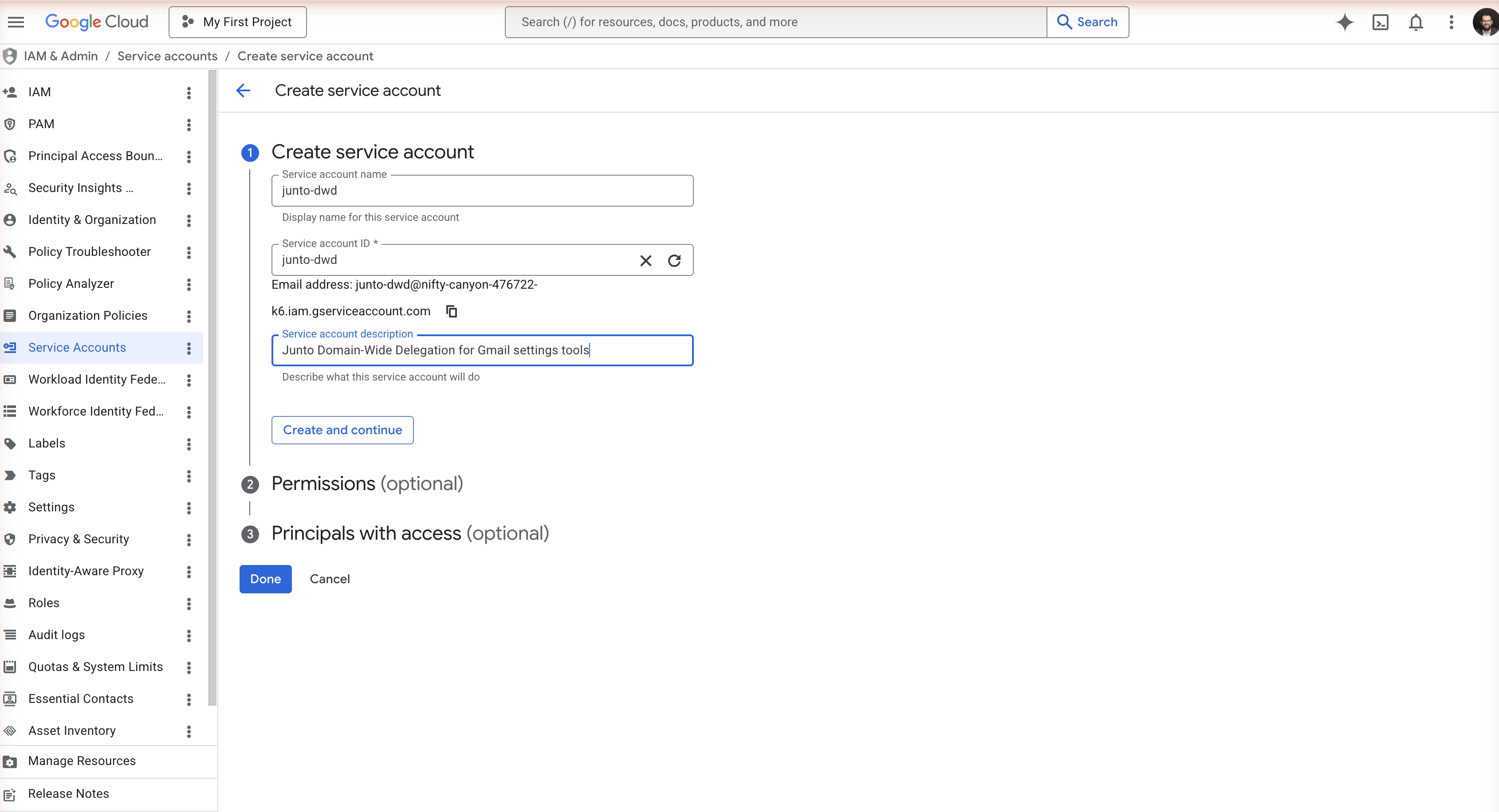
In Google Cloud Console, select the customer's project and go to IAM & Admin → Service Accounts → Create service account. Give it a name like junto-dwd and a description. You do not need to grant any project roles — DWD acts on Workspace APIs, not Google Cloud resources. Click Done to finish creating the service account.
Step 2 — Copy the service account's Client ID
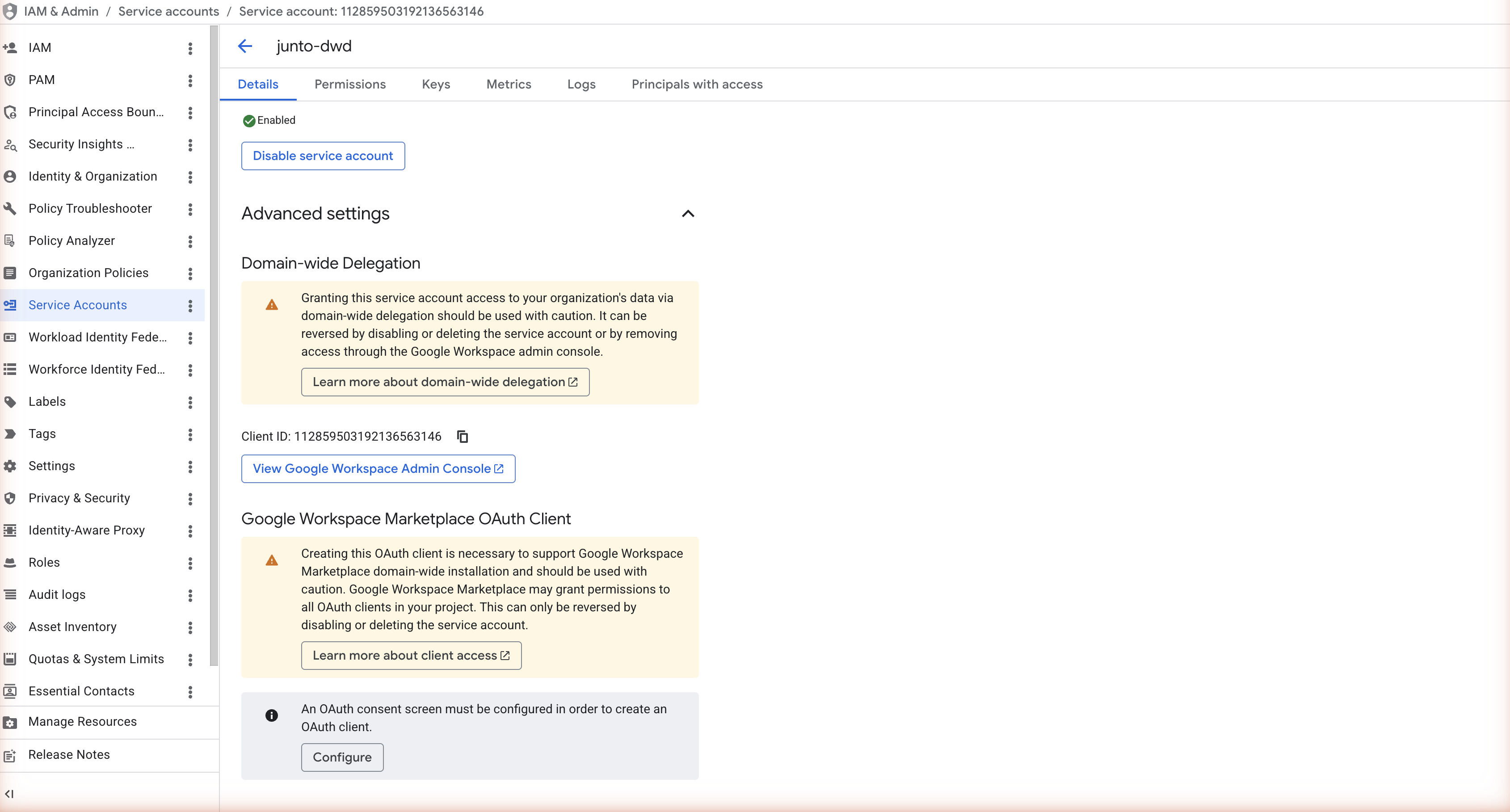
Open the service account, expand Advanced settings on the Details tab, and copy the Client ID shown in the Domain-wide Delegation section. You'll need it in Step 5.
Step 3 — Create a JSON key
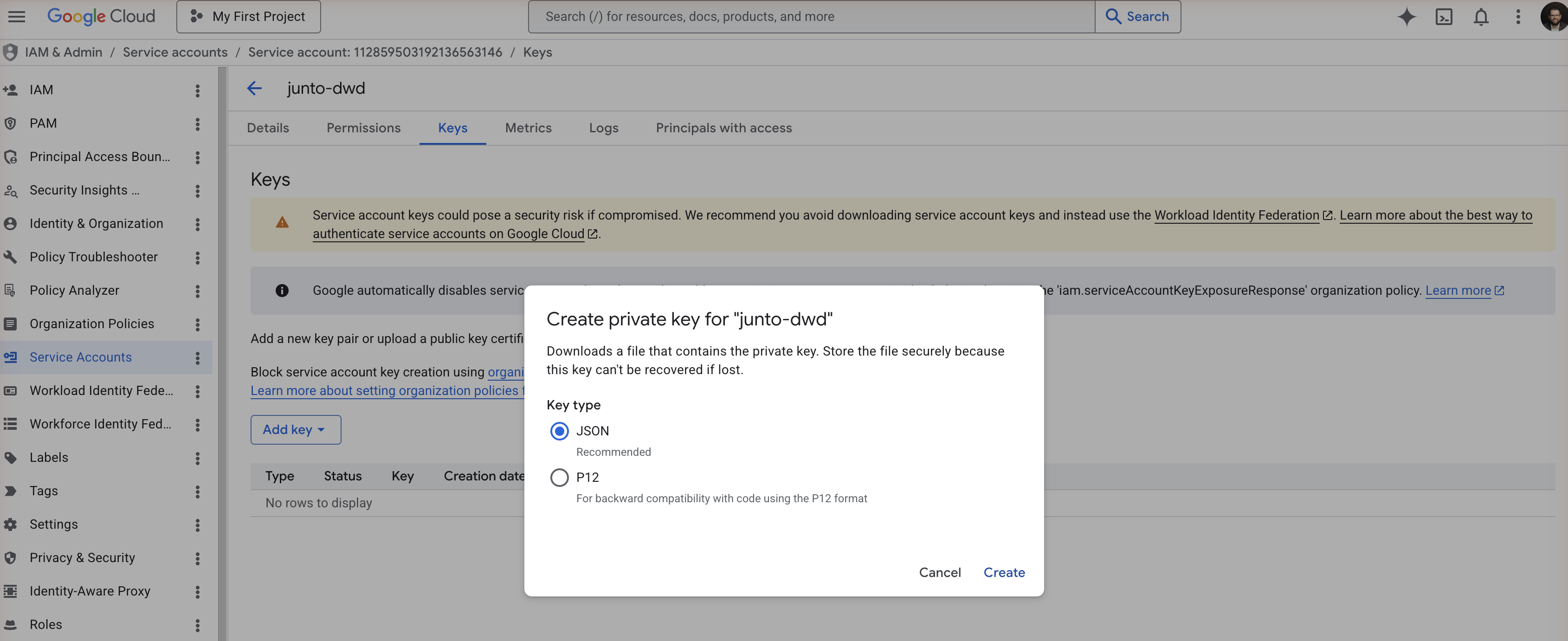
Switch to the Keys tab, click Add key → Create new key, choose JSON, and click Create. Google downloads the .json file to your computer. Store it securely — it contains the service account's private key and cannot be recovered if lost. You'll upload it to Junto in Step 6.
If key creation is blocked
Google's "Secure by default" program enforces an organization policy — iam.disableServiceAccountKeyCreation — that blocks service account key creation on new projects. If you see "Service account key creation is disabled", you need to override the policy at the project level.
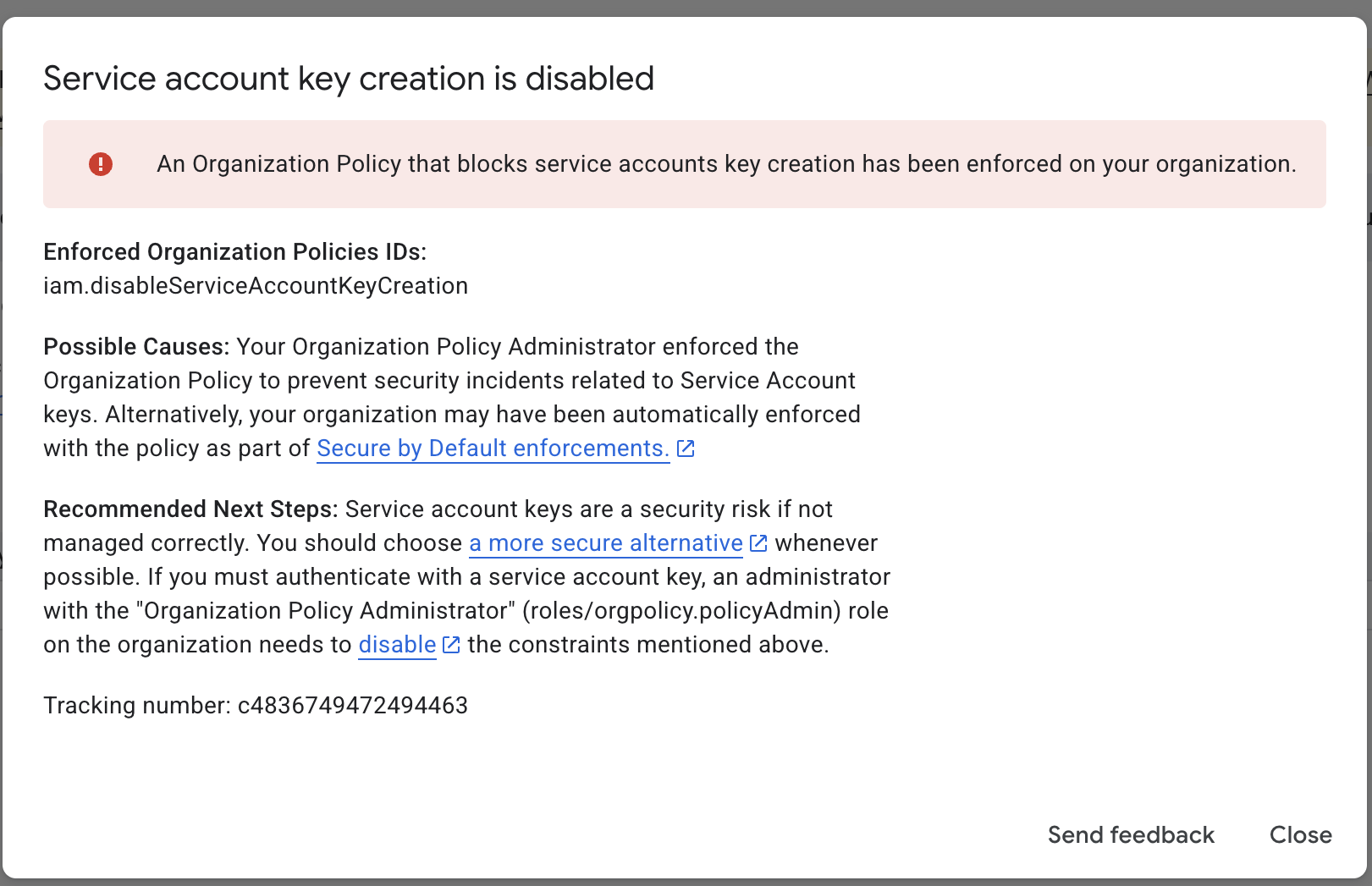
In Google Cloud Console, go to IAM & Admin → Organization Policies, search for "Disable service account key creation", open it, and click Manage policy. Choose Override parent's policy, click Add a rule, set Enforcement: Off, click Done, then Set policy.
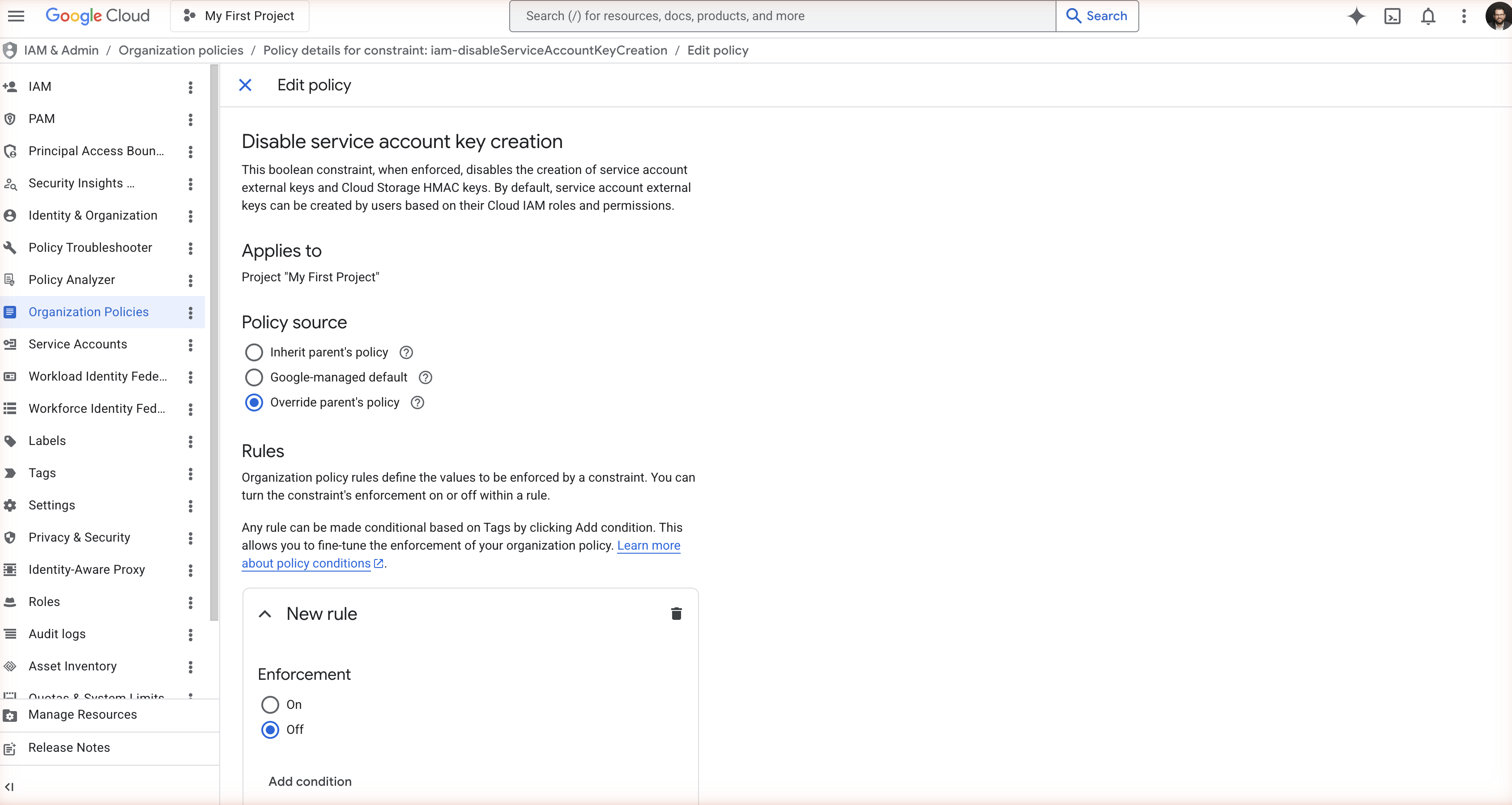
Return to your service account's Keys tab and retry Step 3. This change typically requires the Organization Policy Administrator role (roles/orgpolicy.policyAdmin). If you don't have it, your platform or security team will need to apply the override.
Step 4 — Enable the Gmail API
In Google Cloud Console, open APIs & Services → Library, search for "Gmail API", and click Enable. The Gmail API must be enabled on the project for the service account to mint tokens for Gmail scopes.
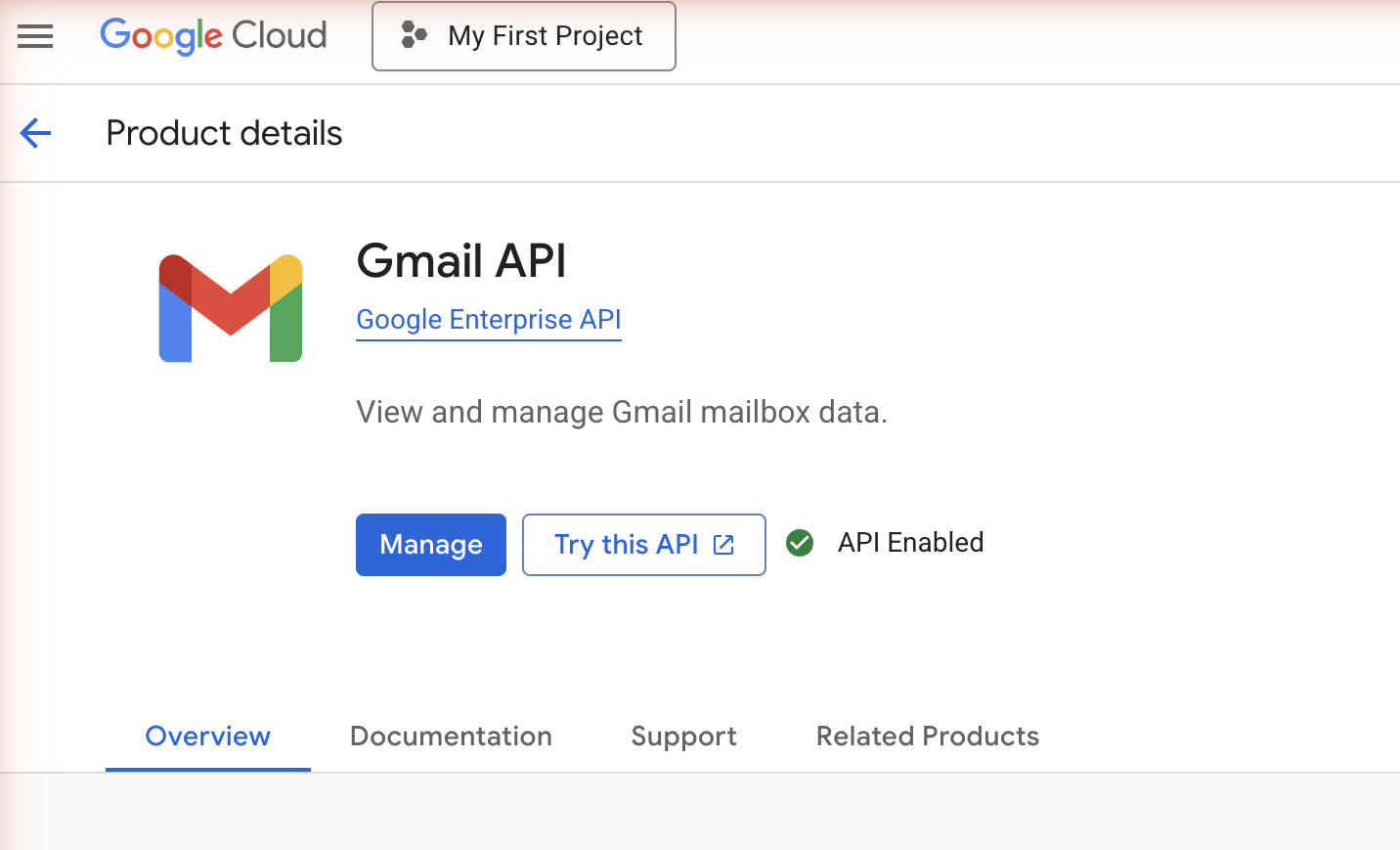
Step 5 — Authorize the service account in Google Admin Console
Sign in to admin.google.com as a Super Admin and go to Security → Access and data control → API controls → Domain-wide delegation. Click Add new, paste the Client ID from Step 2, and add exactly these two scopes as a comma-separated list:
https://www.googleapis.com/auth/gmail.settings.basic,https://www.googleapis.com/auth/gmail.settings.sharingClick Authorize.
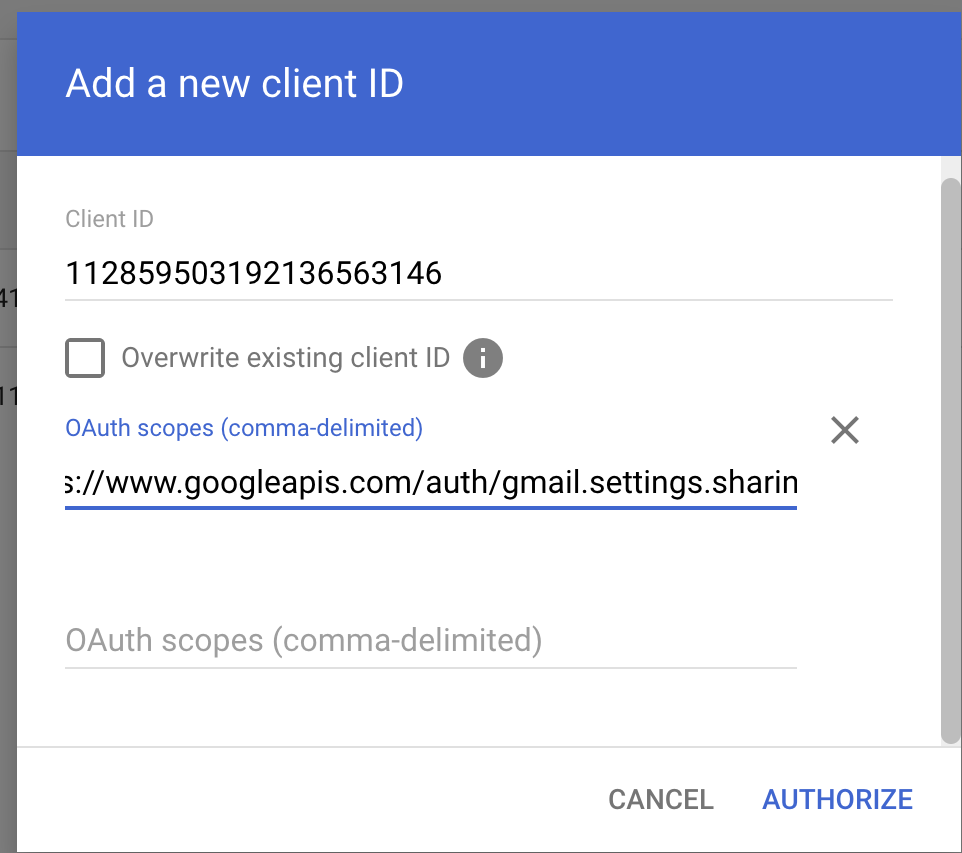
Step 6 — Upload the key in Junto
In Junto, open the company's Integrations page, click into Google Workspace, then Configure Domain-Wide Delegation. Click Upload service account key.
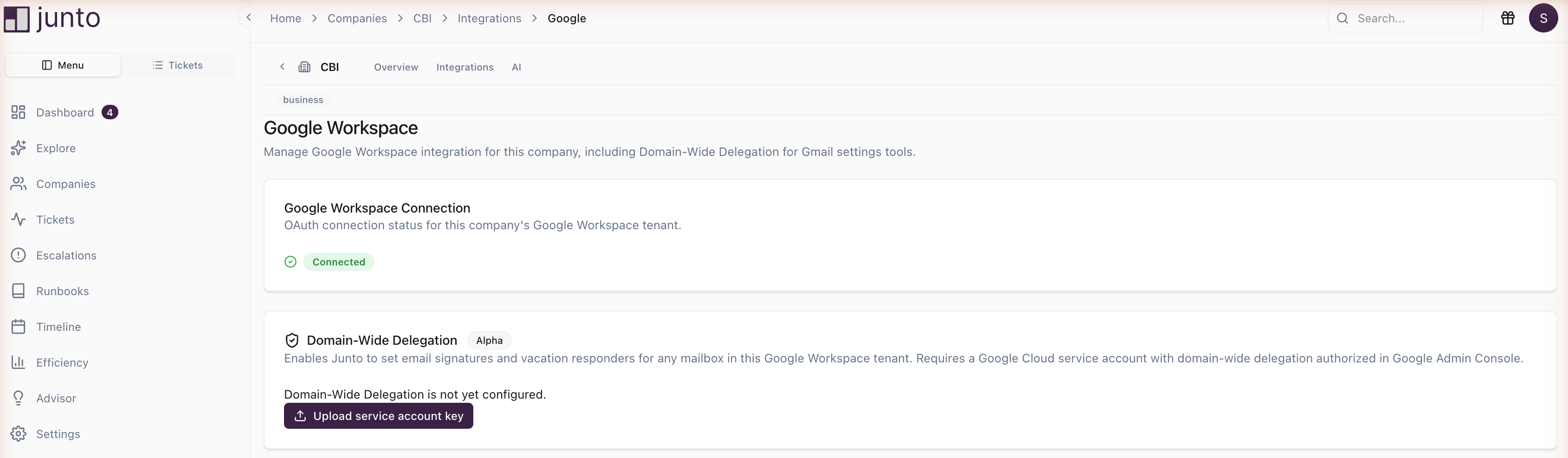
Paste the JSON key contents or use Upload file to pick the .json file from Step 3. Click Save.
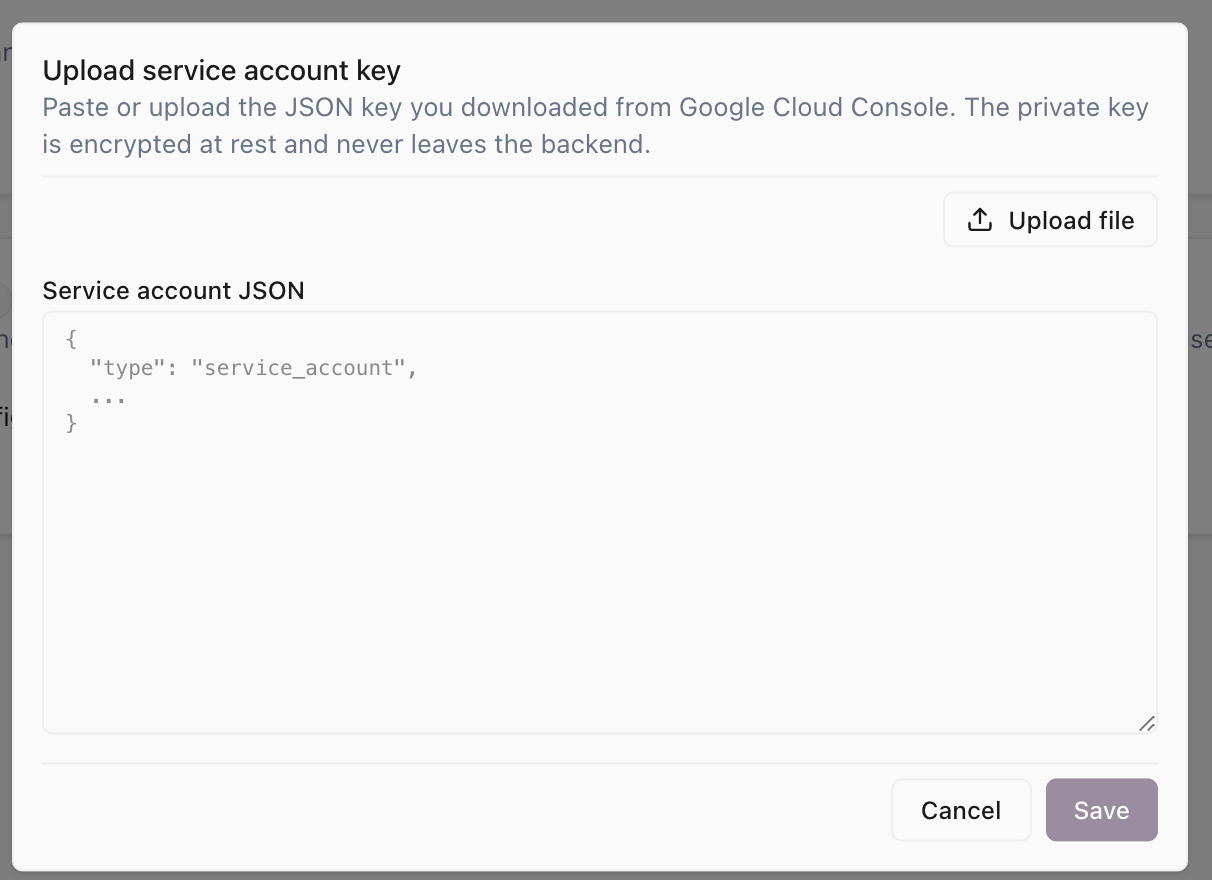
Junto validates the JSON, encrypts the private key at rest, and stores the service account email and key ID. The card then shows Configured and active:
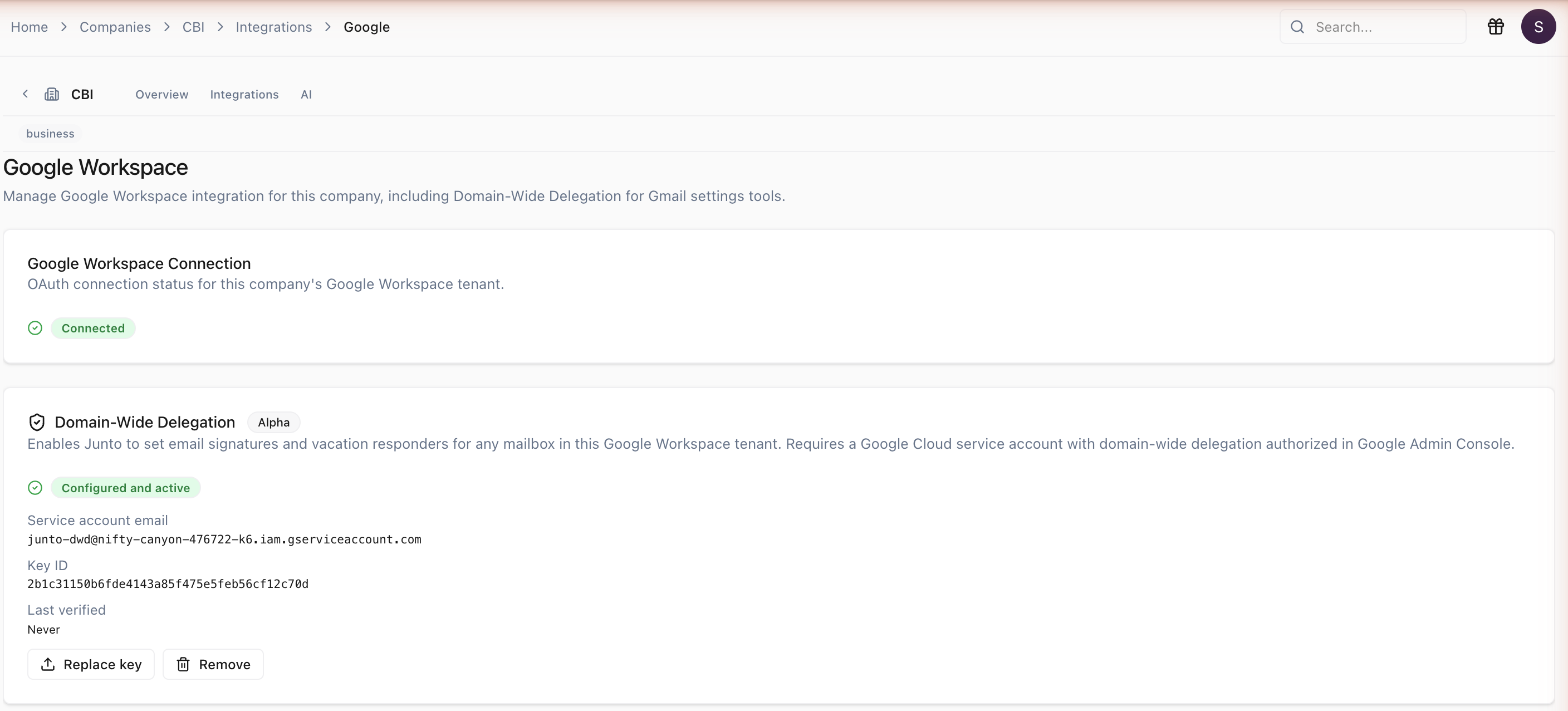
After the upload, delete the downloaded JSON key file from your computer — Junto has the only copy it needs, and the file on disk is a standing credential.
Rotating or removing the key
Replace key uploads a new JSON key, overwriting the stored one. Use this for periodic key rotation. Remove takes the DWD-backed Gmail tools (signature, vacation settings, and all block/allow/unblock/list-filter tools) offline for the company but leaves every other OAuth-based Google tool working.
What the Agent Can Do
Once connected, the agent can help manage the customer's Google Workspace environment across the following areas.
User Management
| Tool | Description | Risk Level |
|---|---|---|
| List Users | List all users in the domain with optional filtering | Low |
| Get User | View user details including name, email, org unit, admin status, and last login | Low |
| Create User | Create a new user account | Medium |
| Update User | Update user profile properties | Medium |
| Suspend User | Suspend a user account, preventing sign-in | High |
| Unsuspend User | Reactivate a suspended user account | Medium |
| Reset Password | Reset a user's password | High |
| Delete User | Permanently delete a user account | High |
Group Management
| Tool | Description | Risk Level |
|---|---|---|
| List Groups | List all groups in the domain | Low |
| Get Group | View group details | Low |
| Create Group | Create a new group | Medium |
| Update Group | Update group properties | Medium |
| List Group Members | View all members of a group | Low |
| Add Group Member | Add a user to a group | Medium |
| Remove Group Member | Remove a user from a group | Medium |
| Delete Group | Permanently delete a group | High |
Organizational Units
| Tool | Description | Risk Level |
|---|---|---|
| List Org Units | List organizational units in the domain | Low |
| Move User to Org Unit | Move a user to a different organizational unit | Medium |
Email Aliases
| Tool | Description | Risk Level |
|---|---|---|
| List User Aliases | List email aliases for a user | Low |
| Add User Alias | Add an email alias for a user | Medium |
| Delete User Alias | Remove an email alias from a user | Medium |
Licensing
| Tool | Description | Risk Level |
|---|---|---|
| List Licenses | List all license assignments for a product, optionally filtered by SKU | Low |
| Get User License | Check if a user has a specific license | Low |
| Assign License | Assign a Google Workspace license to a user | Medium |
| Remove License | Remove a license from a user | Medium |
Security & Access Control
| Tool | Description | Risk Level |
|---|---|---|
| List User Tokens | List OAuth tokens issued to third-party applications for a user | Low |
| Revoke User Token | Revoke a third-party application's access token for a user | High |
Mobile Device Management
| Tool | Description | Risk Level |
|---|---|---|
| List Mobile Devices | List mobile devices managed by Google Workspace | Low |
| Mobile Device Action | Perform actions on a device (wipe, block, approve, account wipe) | High |
Gmail Settings
| Tool | Description | Risk Level |
|---|---|---|
| Set Email Signature | Set or update a user's email signature | Medium |
| Get Vacation Settings | View a user's auto-reply/vacation settings | Low |
| Set Vacation Settings | Configure a user's auto-reply/vacation settings | Medium |
| List User Gmail Filters | List all Gmail filters for a single user — useful for auditing what is blocked/allowed before running an unblock | Low |
| Block Sender (Single User) | Block a sender for one mailbox by creating a filter that routes matching mail to TRASH. Accepts an email address or a bare domain | Medium |
| Unblock Sender (Single User) | Remove a per-user block filter previously created by Block Sender. Only deletes filters whose shape exactly matches what Block Sender creates — user-created filters are left untouched | Medium |
| Allow Sender (Single User) | Allow a sender for one mailbox by creating a filter that removes the SPAM label from matching mail. Use when legitimate mail is being misclassified as spam | Medium |
| Block Sender (Org-Wide) | Block a sender across every active mailbox in the Workspace tenant. Suspended and archived users are skipped. Only protects users who exist at run time — re-run as new users are onboarded | Medium |
| Unblock Sender (Org-Wide) | Remove block filters created by Block Sender across every active mailbox. Only deletes filters whose shape exactly matches what Block Sender creates | Medium |
These Gmail Settings tools require Domain-Wide Delegation to be configured for the company. The org-wide block and unblock tools also need the standard OAuth connection so Junto can enumerate users in the directory.
High-impact actions (account deletion, password resets, device wipes, token revocation, and user suspension) always require technician approval before the agent proceeds.
Troubleshooting
- OAuth connection fails -- Ensure you are signing in as a Super Admin of the customer's Google Workspace domain.
- Missing data -- Some features may require specific Google Workspace editions (Business, Enterprise, Education).
- Token expired -- The integration refreshes tokens automatically. If the connection shows an error, disconnect and reconnect.
- Mobile device actions fail -- Ensure the device is enrolled in Google Workspace mobile management.
- "Service account key creation is disabled" -- The
iam.disableServiceAccountKeyCreationorganization policy is blocking key creation. Override it at the project level (see If key creation is blocked). - Gmail-settings tools return "Domain-Wide Delegation not configured" -- The DWD card in Junto shows "not yet configured", or the scopes in Admin Console don't match. Verify both
gmail.settings.basicandgmail.settings.sharingare authorized in Admin Console for the service account's Client ID. - Gmail-settings tools fail with "Google rejected the token request" -- Usually means the Client ID in Admin Console doesn't match the uploaded key, the Gmail API is not enabled on the project, or the impersonated user doesn't exist in the Workspace domain. Check Steps 2, 4, and 5.
- Org-wide block/unblock returns per-user failures -- The org-wide tools fan out across every active mailbox and report
succeeded,failed, andskippedlists. Suspended and archived users are always skipped. Per-user failures usually mean DWD is not authorized for that mailbox, the user was created or modified mid-run, or Gmail API rate limits were hit — re-running the tool will retry only the failed users. Newly onboarded users created after the run are not protected; re-run the org-wide block to cover them.