

Appearance
SentinelOne Setup
SentinelOne is an endpoint detection and response (EDR) platform. Once connected, Junto can look up endpoints, investigate threats and alerts, manage endpoint isolation, trigger scans, and run Deep Visibility queries across your fleet.
Prerequisites
- A SentinelOne account with permission to create service users
- A service user API token generated from your SentinelOne management console
- Your SentinelOne instance URL (e.g.,
https://usea1.sentinelone.net)
Step 1: Generate an API Token
We recommend using a dedicated service user rather than a personal account, so the token isn't tied to an individual and doesn't break if that person leaves or their access changes.
Log in to your SentinelOne management console.
Navigate to Settings > Users > Service Users.
Click Actions > Create New Service User.
Enter a name (e.g., "junto") and an expiration date, then click Next.
Under Select Scope of Access, choose Site.
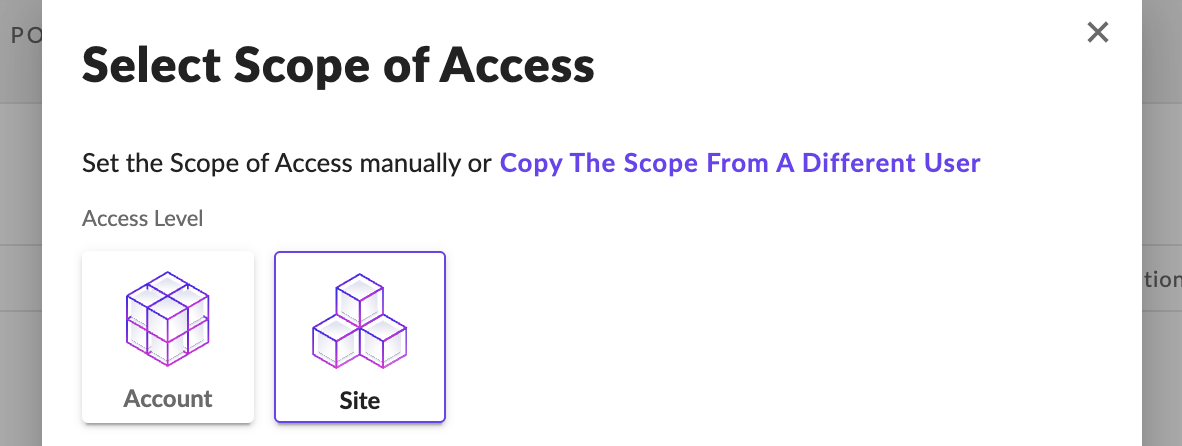
The wizard then prompts you to add accounts. Add all the accounts Junto should manage, and assign the IR Team role (or an equivalent role with incident response permissions) for each account.
Click Create User and copy the API token. It will not be shown again.
Step 2: Configure in Junto
- In Junto, go to Settings > Integrations > SentinelOne.
- Click Add Configuration and fill in:
- API URL -- Your SentinelOne instance URL.
- API Token -- The token from Step 1. This is encrypted before storage.
- Click Create. Junto validates the connection by listing your SentinelOne sites.
Step 3: Map Companies to Sites
SentinelOne organizes endpoints into Sites. Each MSP client is typically a separate site.
- After connecting, Junto lists available sites from your SentinelOne account.
- Use the company mapping interface to link each Junto company to its SentinelOne site.
- Auto-map is available to match by name.
- Save mappings.
What the Agent Can Do
Endpoint Management
| Tool | Description | Risk Level |
|---|---|---|
| List Endpoints | Search for endpoints by hostname, OS type, infection status, or active status | Low |
| Get Endpoint Details | View detailed information about a specific endpoint | Low |
| Scan Endpoint | Initiate a full disk scan on one or more endpoints | Medium |
| Isolate Endpoint | Disconnect an endpoint from the network (network quarantine) | High |
| Reconnect Endpoint | Restore network access to a previously isolated endpoint | High |
Threat Investigation & Response
| Tool | Description | Risk Level |
|---|---|---|
| List Threats | List detected threats with filtering by resolved status, mitigation status, or analyst verdict | Low |
| Get Threat Details | View detailed information about a specific threat | Low |
| Mitigate Threat | Take action on a threat: kill, quarantine, remediate, or rollback | High |
| Update Threat Verdict | Set analyst verdict (true positive, false positive, suspicious, or undefined) | Medium |
| Add Threat Note | Add analyst notes to a threat for documentation | Medium |
Alert Management
| Tool | Description | Risk Level |
|---|---|---|
| List Alerts | List cloud detection alerts with optional filtering by analyst verdict | Low |
| Update Alert Verdict | Set analyst verdict on cloud detection alerts | Medium |
Deep Visibility Queries
| Tool | Description | Risk Level |
|---|---|---|
| Create Query | Search endpoint telemetry data across your fleet | Medium |
| Check Query Status | Check the status of a running Deep Visibility query | Low |
| Get Query Results | Retrieve events from a completed Deep Visibility query | Low |
Infrastructure
| Tool | Description | Risk Level |
|---|---|---|
| List Sites | List all SentinelOne sites in the account | Low |
High-impact actions like endpoint isolation, reconnection, and threat mitigation require explicit technician approval before the agent proceeds.
Troubleshooting
- Connection fails -- Verify your API URL and token. Ensure the token has not expired or been revoked.
- No sites listed -- Confirm your API token has sufficient permissions to view sites.
- Endpoint not found -- Check that the company mapping is correct and the endpoint is enrolled in the expected site.
- Deep Visibility query returns no results -- Ensure target endpoints are online with the SentinelOne agent running. Queries search recent telemetry data.